
A demographic segment is a way to split respondents into groups by demographic variables — department, level, tenure, location — so you can see which group an issue sits in, rather than only looking at the company-wide average.
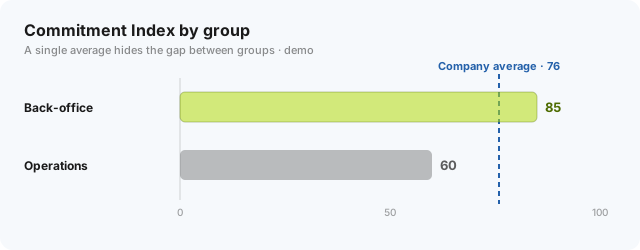
Averages hide differences: a company-wide Commitment Index (CI) of 76 might be 85 in back-office and 60 in operations. Segments let you see that and act in the right place.
Which variables to choose
Prioritise variables that actually drive decisions:
- Department / function — issues usually differ most clearly here.
- Level — staff and managers experience the company differently.
- Tenure — new joiners vs long-tenured reflect onboarding and retention.
How to set it up
- Choose 3–5 variables that drive decisions.
- Keep each group large enough to stay anonymous (above the minimum threshold).
- Avoid variables so granular they make groups tiny or reveal identity.
- Cross-reference segments with theme scores and eNPS to find the group to prioritise.
Need help setting this up for your company? Book a consultation.
A common mistake
Splitting by too many variables → tiny groups → you lose anonymity and the numbers are no longer reliable enough to conclude from. Fewer but meaningful beats many but fragmented.